
Step 6: Setting Thresholds and Rounding Rules
In this step of the Company Creation Wizard you will set thresholds and rounding rules used in various
calculations throughout the system.
Thresholds may vary from one financial year to the next and you should always ensure that you are using the most up-to-date information.
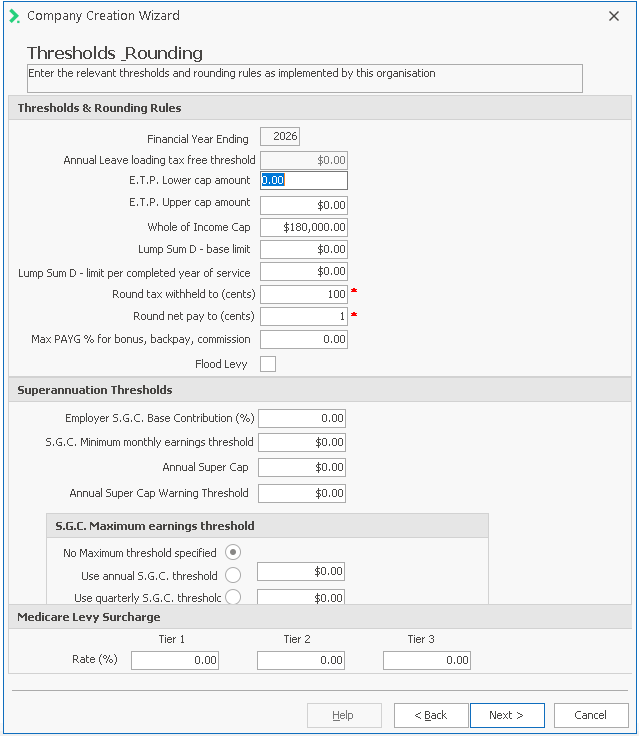
Setting the thresholds:This is an optional stage in the company set up and can be completed at a later stage by entering Financial Years.
However, if you do want to complete this threshold information at this point you must enter the mandatory information, Tier 1, Tier 2 and Tier 3 .
Note: The figures noted belw in Thresholds & Rounding Rules relate to the 2024 financial year. You should refer to the current financial year thresholds when adding these into Ready Pay
| Field Name | Explanation |
| Thresholds & Rounding Rules | |
| Financial Year Ending | This will default to the financial year you have created at Step 5 |
| Annual Leave Loading Tax Free Threshold | Is no longer valid. All leave loading is now taxable. |
| E.T.P. Lower Cap Amount | This value is the low rate threshold for an ETP payment a person may receive on termination. A lower tax rate applies to this portion, and can only be applied in certain cases. For further information on any of these thresholds, please refer to the ATO website at www.ato.gov.au. |
| E.T.P. Upper Cap Amount | This value is the upper rate threshold for an ETP payment for which a higher tax rate applies. For further information on any of these thresholds, please refer to the ATO website at www.ato.gov.au. |
| Whole of Income Cap | The whole-of-income cap is currently $180,000 minus other taxable income earnt throughout the income year. The taxable component of the ETP is taxed based on age up to the whole-of-income cap. ETP amounts over the whole-of-income cap are taxed at the top marginal tax rate. |
| Lump Sum D - base limit | This is the base limit for the tax free portion of an ETP payable on redundancy, regardless of how long the employee has been working with the company. |
| Lump Sum D - limit per completed year of service | This is the tax free threshold per completed years of service for redundancy payments. |
| Round Tax Withheld to (cents) | To round tax to the nearest dollar, enter 100 in this field. This is the recommended option, as the ATO require that tax is submitted to the nearest dollar. |
| Round Net Pay to (cents) | If you have rounded tax to the nearest dollar, you must round net pay to the nearest cent. Enter 1 in this field. |
| Max PAYG % for bonus, backpay, commission | The ATO specifies a maximum tax rate for these lump sum payments. This maximum rate is referred to as the Withholding limit. The current limit as at July 1, 2024 is 47% |
| Flood Levy | This item is no longer relevant. |
| Superannuation Thresholds | |
| Employer SGC Base Contribution (%) | This is the minimum superannuation guarantee contribution (SGC) that an employer can make on behalf of their employees. New super funds and employee super pay items default to this value. |
| SGC Minimum Monthly Earnings Threshold: | This item is no longer relevant and should be set to 0. |
| Annual Super Cap | this is the maximum amount of before-tax contributions you can contribute to your super each year without contributions being subject to extra tax. As at July 1, 2024 the cap is $30,000 |
| Annual Super Cap Warning Threshold | This is set by the employer to receive a warning before the Annual Super cap is reached so as to advise the employee. |
| S.G.C. Maximum earnings thresholds | |
| No Maximum threshold specified | Select this option if you wish to ignore this threshold for all employees. |
| Use annual S.G.C. threshold | Select this option if you wish to use the Annual SGC Threshold as the maximum earnings base for calculating super. As At July 1, 2024 the annual threshold is: $260,280 |
| Use quarterly S.G.C. threshold | Select this option if you wish to use the Quarterly SGC Threshold to calculate the maximum earnings base per quarter. As At July 1, 2024 the quarterly threshold is: $65,070 |
| Medicare Levy Surcharge | |
| Tier 1 | Current rate as at 1 July, 2024 1% |
|
Tier 2 |
Current rate as at 1 July, 2024 1.25% |
| Tier 3 | Current rate as at 1 July, 2024 1.50% |
 Any amounts rounded off tax are added onto net pay, and vice versa. Rounding both tax and net pay by other than the recommended settings may result in errors on your payroll.
- Once you have entered all the information required, click Next.
A message will appear telling you the tax scales for the Financial Year have been installed on the system and asking if you would like to install any newer versions by downloading them from the Ready Pay website.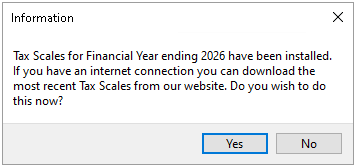
- If you want to install a more recent set of tax scales, click Yes.
- Click No if you do not need to download more recent Tax scales and you will be taken to the next step, States.
If your tax scales are not found in the system, you can skip this step for the moment.
After the company has been created, you can download and install the latest tax scales from
Once you have entered all the information required, click NEXT.